
I built an AI transcription pipeline to solve a problem that sounded simple and wasn’t. The task: take a scanned, page-image PDF of a 2,034-page book and turn it into a clean, fully Unicode .docx file. The book mixed English commentary with a custom transliteration scheme. That scheme used heavy diacritics — dots under letters, macrons over vowels, and other accent marks most software has never seen.
Here’s how the project went, including two failed attempts, before the pipeline finally worked.
The Goal: A Publishable Manuscript, Not a Rough Draft
The target was clear. Digitize the whole book accurately enough to publish it. No weeks of manual retyping. No page-by-page correction pass by hand. Just an automated AI transcription pipeline that could handle both plain English text and specialized diacritic characters like ḥ, ṭ, ṣ, ḍ, ā, ī, and ū.
That last requirement ruled out most off-the-shelf tools before the project even started.
Attempt One: Standard OCR Failed Quietly
I started with the obvious option: standard OCR. Tools like Tesseract handle plain text well. But they aren’t trained on diacritic-heavy character sets like this one.
The dotted letters and macrons weren’t in the model’s vocabulary. So the OCR engine guessed. It swapped in characters that looked plausible but were wrong. That’s a worse failure than an obvious typo. A typo announces itself. A silently wrong character doesn’t — you only catch it by checking every line against the original scan.
Next, I tried a cheaper option to save cost. I routed pages through a smaller, free-tier vision model instead of a full OCR engine. I assumed “good enough” would work for a first pass.
It didn’t. The very first pilot page came back empty. No error, no partial text — just nothing.
That blank page changed my thinking. This wasn’t a job for a cheaper version of the same approach. It needed a different approach entirely.
Building a Real AI Transcription Pipeline
I rebuilt the process around three ideas: use a model that can actually see and understand a page, structure the output so code can assemble it, and make the whole run resilient enough to survive hours of processing unattended.
The pipeline now runs in three stages:
- Convert the PDF into individual page images.
- Transcribe each page with a vision-capable model — Claude — using a prompt tuned to the book’s specific transliteration rules. Each page returns structured, typed content: heading, translation, transliteration, commentary, or footnote.
- Assemble the structured data into a finished
.docxfile.
I routed every model call through OpenRouter instead of locking into one provider. That let me A/B test Claude, Gemini, and GPT vision models on a pilot batch first. Only after that test did I commit the full book to a multi-hour run.
Resilience mattered just as much as accuracy. Every page writes its own checkpoint file as soon as it finishes. If a rate limit hits, the network drops, or my laptop sleeps mid-run, the pipeline resumes from exactly where it stopped. It never restarts from zero.
Making Accuracy Measurable
A capable vision model solved the reading problem. It didn’t solve a harder one: how do you trust 2,034 pages of automated output without reading all of them yourself?
I added two features to answer that question.
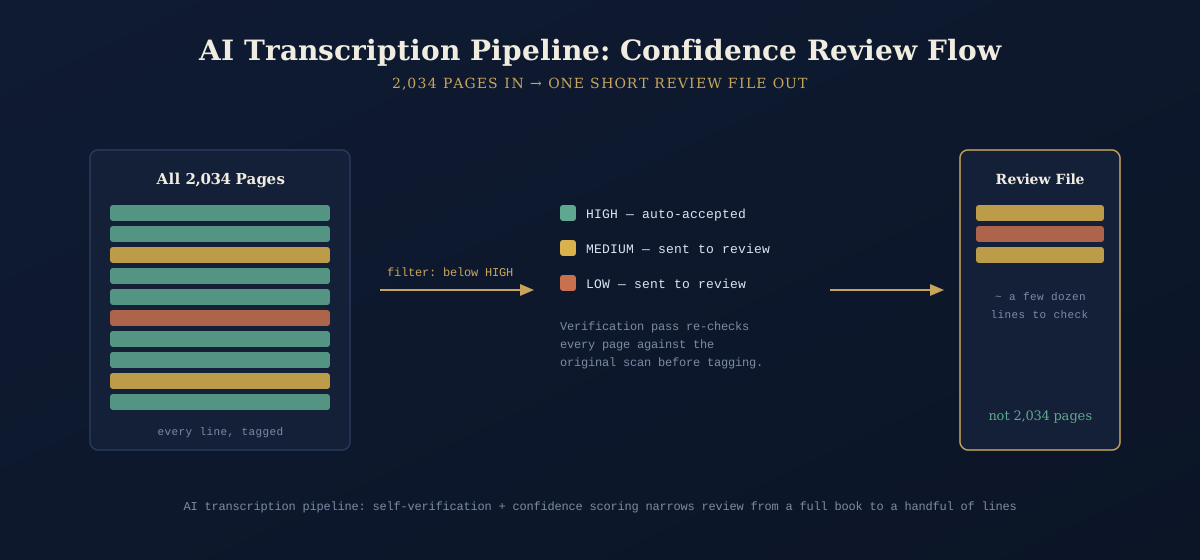
A verification pass. Every page gets transcribed twice. On the second pass, the model reviews its own first draft against the original image and corrects its own mistakes. This catches errors a single pass misses.
Self-reported confidence scoring. Every line comes back tagged high, medium, or low confidence. The assembly stage automatically pulls anything below “high” into one review file. Instead of rereading 2,034 pages, I only need to check the lines the model itself flagged as uncertain.
This turned an unmanageable review task into a short, targeted one.
Fixing a Security Gap Along the Way
The rebuild also surfaced a problem unrelated to accuracy. An OpenRouter API key had been hardcoded into the first version of the script as a fallback default. That’s an easy mistake to make and an easy one to accidentally commit or share.
I removed the key, rotated it, and changed the script to read credentials from the environment only. If the key is missing, the script refuses to run. No silent fallback, no hardcoded default.
What the Final Pipeline Delivers
The finished AI transcription pipeline:
- Learned from two failed approaches before landing on the right one
- Double-checks its own transcription work automatically
- Flags its own uncertainty, so review time goes where it’s actually needed
- Survives crashes, rate limits, and sleep mode without losing progress
- Stays model-agnostic, so stronger vision models can replace weaker ones over time
The Real Lesson
Here’s the takeaway that mattered most. “Cheaper first pass” and “good enough” aren’t the same thing. They especially aren’t the same thing when your source material is dense, specialized, and punishes silent errors.
It’s tempting to reach for the cheapest option and hope it works. Sometimes that’s fine. Here, it wasn’t. The faster path forward meant admitting the first two approaches had failed, then rebuilding around what the material actually needed: real vision understanding, self-verification, and measurable confidence instead of blind trust.
That shift — from hoping the model got it right to having it tell you how sure it is — turned a 2,034-page transcription problem into a pipeline I could actually trust.
Related reading: see our breakdown of OCR vs. vision-language models for document digitization, and our guide to building resumable data pipelines for long-running automation jobs.





Recent Comments